 Vellm
Load TikTok’s player to watch this reference. This connects your browser to TikTok.
If the player is unavailable in your region or the post has been removed, try opening the original post.
View original post ↗
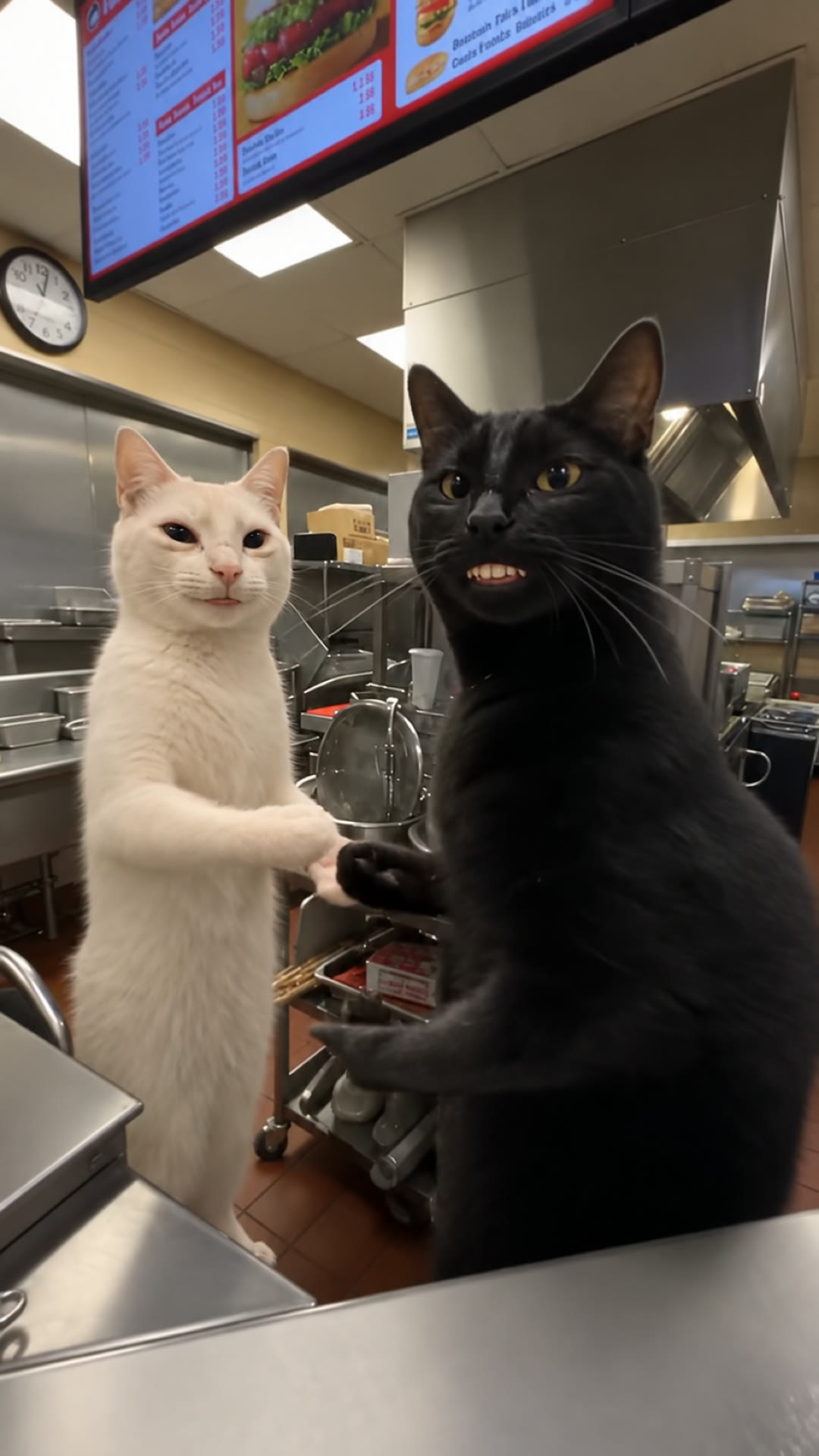
Waiting On My Fries Cats AI is a 24-second video from 2 photos for 100 credits ($9.99), with the original sound optional. Your two cats work a fast-food counter: one forgot the fries, the other stalls the customer with a slow, dead-serious dance. 2 photos, 24-second vertical video. Silent, or with the original clip sound for personal viewing.
To post, download it silent and add the trending sound in TikTok or Reels.
0 of 2 required
Add your photos
0 of 2 added
Dancer at the counter
Photo 1, required: your cat, one pet, face, ears and body clearly visible. It stands closest to the camera, talks to the customer, sends the other cat to the fryer and does the slow dance to the end.Coworker who forgot the fries
Photo 2, required: your second cat, one pet, face, ears and body clearly visible. It stands at the back, grabs its head when it remembers the fries and walks off to the fryer; it looks small for most of the clip.Use photos you have permission to use.
We’ll email a link to the email you use at checkout. No sign-in is needed to view your video.
Load TikTok’s player to watch this reference. This connects your browser to TikTok.
If the player is unavailable in your region or the post has been removed, try opening the original post.
View original post ↗Watch this reference on Instagram.
View original post ↗Credit does not establish trend ownership or permission to reuse a creator’s work.
To make the Waiting On My Fries cat video, upload a photo of the cat that dances and a photo of the cat that forgot the fries, then generate. You get a 24-second vertical video for 100 credits; the smallest pack is USD 9.99. Download it silent and add a sound when you post, or with the original clip's sound for personal viewing.
This template recreates the cat version of the Waiting On My Fries skit. Two cats stand on their back legs behind a fast-food counter. A customer, heard but never seen, is still waiting on their fries; the cat at the back realises it forgot them, the cat in front sends it to the fryer and then stalls the customer with a slow, dead-serious dance. Our reference is the AI clip TikTok creator merkurianin posted on 19 November 2026, a cat remake of the October skit by f.r3n. It is one handheld take.
Photo 1, the dancer. Required. The cat closest to the camera, right behind the counter. It talks to the customer, points the other cat to the fryer and dances alone for most of the video, finishing with a wide grin.
Photo 2, the coworker. Required. The cat at the back who forgot the fries. It grabs its head, walks off, and turns up again at the fryer in the background when the camera swings round.
Good photos. One cat per photo, with the face, ears and body visible in good light. Each cat keeps its own coat and markings. Only one cat? Add the same photo twice and it plays both parts.
The counter, the kitchen, the camera moves and the timing come from the original clip; each photo supplies one cat's look. There is no customer on screen: in the original the customer is only a voice. Vellm is not affiliated with merkurianin, f.r3n or TikTok.
Cat photo tips for AI dance videosMore AI cat dance templatesUSD 9.99 buys 100 credits, enough for one video with this template. This is a one-time purchase. Taxes are shown at checkout.
Most videos are ready in about 7 minutes, and longer ones can take up to 15. If a generation fails, your credits come back automatically.
Credits come in one-time packs, with no subscription. See current prices.
One handheld take from the customer's side of the counter. Your first cat takes the front cat's place and your second cat the coworker's; the timing stays the same.
The camera comes up to the counter; two cats stand on their back legs behind it while the customer asks about the fries.
The coworker at the back grabs its head with both paws.
The front cat turns and waves the coworker off to the fryer, and the coworker walks out of shot.
Alone at the counter, the front cat faces the camera and dances slowly and seriously, paws over its chest, while the customer complains and then gives in.
The camera swings round to the coworker standing idle at the back; the front cat turns and sends it off again.
The front cat turns back to the camera, keeps dancing and ends on a wide, open-mouthed grin.
A comedy skit from October 2026: a customer asks about their missing fries, one worker admits they forgot them, and the other sends them to the fryer and distracts the customer with a slow, serious dance until the customer gives in. On 19 November 2026 merkurianin posted an AI version with two cats behind the counter, and people now remake it with their own cats. Vellm is not affiliated with merkurianin, f.r3n or TikTok.
Two, one cat in each. Photo 1 is the dancer in front of the counter; Photo 2 is the coworker who forgot the fries. The order decides who plays which part.
Yes. Add the same photo as Photo 1 and Photo 2 and your cat plays both the dancer and the coworker.
The template is made for two cats, like the original. A dog photo is accepted, but cats are the closest match.
24 seconds, vertical 9:16, with a 1080p enhanced export. Download it silent, or with the original clip's sound for personal viewing.
USD 9.99 for one 24-second video (100 credits), no plan needed. The 100-credit one-time pack covers it, and taxes are shown at checkout.
Yes. Every video comes in two versions: silent, best for posting (add the trending sound in TikTok or Reels), and with the original clip's sound, for personal viewing. The sound isn't licensed for public posts.
The original clip guides both cats. Check the dancer in the close-up dance and the final grin, and check the coworker at the back, where it is small; cats that look alike can swap markings. A new generation uses another 100 credits and may look different.
A failed generation returns the credits it used. This is a credit return, not a cash refund. For a completed result or billing issue, contact support. See the service terms for details.
No. Your downloaded video has no watermark.
Most videos are ready in about 7 minutes, and longer ones can take up to 15. We email you when your video is ready.
No account is needed for a one-time purchase. Use your checkout email to recover your creations. If you create a video while signed in, use the same account to view it.
AI results vary, and a new generation uses credits. If you run into a technical problem, email support@vellm.app.
You can request a refund for a one-time credit pack within 7 days of purchase if none of its credits have been used. Email support@vellm.app. See our terms for details and your consumer rights.
Photos and videos, including the version with sound, are scheduled for deletion after 7 days. Download your video before it expires. See our Privacy Policy for details.
contact support · Terms of Service · Privacy Policy
How credits and video costs work