 Vellm
Vellm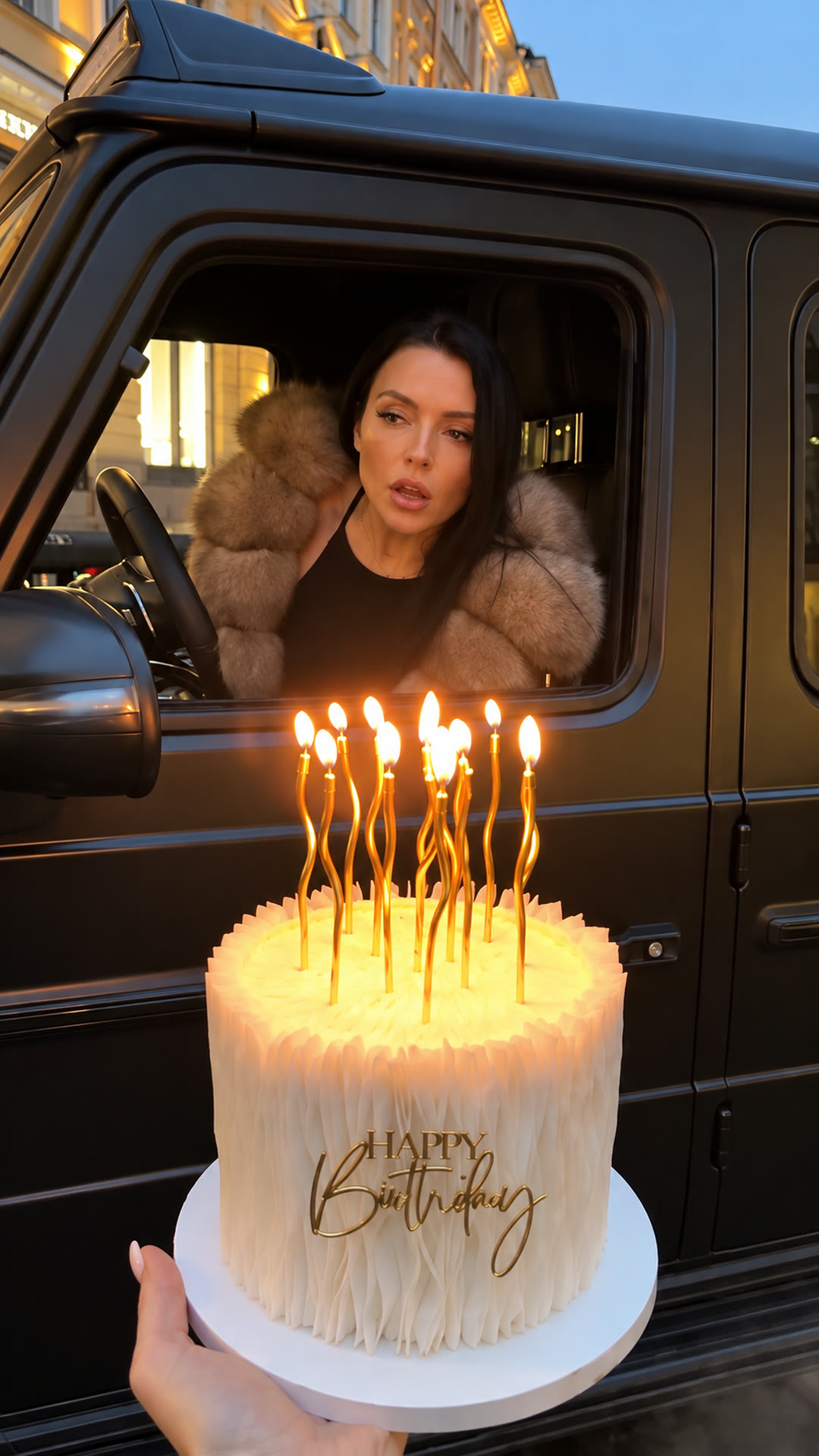
Watch this reference on Instagram.
View original post ↗
ShareSound off
Cinematic
Make yoursBirthday Car AI
- 1 photo
- 50 credits · $6.99 for one video
- 7s · 9:16
- Sound: original clip sound optional
- No sign-in
Birthday Car AI
One photo puts you in the Birthday Car trend: a black SUV pulls up and you lean out to blow out the candles. Add a cake photo to use your own cake. 7-second vertical video. Silent, or with clip sound for personal viewing.
50 credits · $6.99 for one videoFrom $4.58 / video with the Keep creating pack (600 credits, $54.99 total).See prices
Sound: original clip sound optional7 sec9:161080p
To post, download it silent and add the trending sound in TikTok or Reels.
Create your video
Your photo
0 of 1 required · 1 optional
Add your photos
0 of 2 added
Your photo
Photo 1: one adult who has agreed to appear. Head and shoulders or waist up, face clear and toward the camera. The photo supplies the face, hair and top you wear.Your cakeOptional
Photo 2, optional: a photo of the birthday cake you want in the video, the whole cake in frame, seen from the side. Leave it empty to keep the tall white cake from the clip. The candles and the moment they go out stay as in the clip.Photo tips
- Photo 1 is required: you or another adult who has agreed to appear, no celebrities, no one under 18
- Head and shoulders or waist up, face toward the camera, good light, no sunglasses
- Photo 2 is optional: a cake, whole and seen from the side, without hands covering it
- The video supplies the black SUV, the wet city street, the candles and the timing
Use photos you have permission to use.
QualityHDChange
We’ll email a link to the email you use at checkout. No sign-in is needed to view your video.
About this trend & references
Trend references
Credit does not establish trend ownership or permission to reuse a creator’s work.
To make the Birthday Car video, upload one clear photo of one person, and a cake photo if you want your own cake, then generate. You get a 7-second vertical video for 50 credits; the smallest pack is USD 6.99. Download it silent and add the sound when you post, or with the original clip's sound for personal viewing.
How to make the Birthday Car video
- Upload one well-lit head-and-shoulders or waist-up photo of one adult with the face clearly visible. Optionally add a photo of your cake, seen from the side.
- Check the price: 50 credits. No account is needed for a one-time purchase.
- Generate, then check the face in the window close-up and in the black-and-white ending.
- Download your 9:16 video silent and add the sound in TikTok or Reels, or download it with the original clip's sound for personal viewing.
Start with a clear photo
Choose a well-lit head-and-shoulders or waist-up photo of one adult with the face clearly visible and toward the camera. Use a photo of yourself or someone who has agreed to appear.
This template recreates the Birthday Car trend from Instagram Reels: a friend holds a candlelit birthday cake on a wet city street at dusk, a black SUV drives up and stops right behind it, the driver leans out of the window and blows out the candles, and the clip fades to black and white as Happy Birthday writes in.
Your photo guides the driver's face, hair and top. Add a second photo of a cake and it replaces the white cake from the clip; the candles and the moment they go out stay the same. The car, the street, the friend's hand and the black-and-white ending come from the original clip. The video is vertical.
Upload one photo of one person, plus an optional photo of a cake. The video is vertical (9:16) and follows the original one-take clip from the SUV driving up to the black-and-white ending. Download it silent, or with the original clip's sound for personal viewing.
More AI car video templatesMore AI birthday video templatesHow to make the champagne birthday AI video from one photoYour video, at a glance
- Length
- 7 seconds
- Format
- 9:16
- Export
- 1080p enhanced
- Sound
- Silent or original sound (personal viewing)
- Watermark
- None
- Per generation
- 50 credits
USD 6.99 buys 50 credits, enough for one video with this template. This is a one-time purchase. Taxes are shown at checkout.
Most videos are ready in about 7 minutes. If a generation fails, your credits come back automatically.
Credits come in one-time packs, with no subscription. See current prices.
What happens in the video
The original clip is one handheld take at dusk, filmed by the friend who holds the cake at the bottom of the frame.
0–1.5 s The cake
A tall white cake with lit candles fills the foreground while a black SUV drives toward the camera down a wet cobblestone street.
1.5–2.5 s Pull up
The SUV turns in and stops right behind the cake, its driver's window facing the camera.
2.5–4.5 s Blow
You look out of the open window at the cake, lean toward it and blow out all the candles; thin smoke rises.
4.5–7 s Happy Birthday
The picture fades to black and white, you look into the camera, and Happy Birthday writes in across the frame in white script.
Before you generate
What is the Birthday Car trend?
An Instagram Reels trend that took off in October 2026 after @mira__98kr's reel: a friend holds a birthday cake on the street, a black SUV pulls up, the driver leans out of the window and blows out the candles, and the clip fades to black and white with Happy Birthday. Creators then made desert-drift and motorbike versions. This template recreates the original city clip with your photo. Vellm is not affiliated with the creator of the original clip.
How many photos do I need?
One head-and-shoulders or waist-up photo of one person, with the face clearly visible. A second photo of a cake is optional.
Whose photo can I use?
Your own photo, or a photo of another adult who has agreed to appear. No celebrities and no one under 18.
Do I keep my own outfit?
Yes. The driver wears the top from your photo, not the fur coat from the original. Only the upper body shows in the car window, so a waist-up photo is enough.
Can I use my own birthday cake?
Yes. Add a photo of the cake as photo 2, the whole cake in frame and seen from the side. It replaces the tall white cake from the clip in every frame. The tall gold candles stay, and you still blow them out at the same moment. Leave photo 2 empty to keep the original cake.
Can the Happy Birthday text show a name?
No. The white Happy Birthday script stays exactly as in the original clip. Add a name or a caption in your posting app. With a cake photo, the decorations on your cake replace the clip's gold cake topper; small writing on a cake can come out misspelled.
How long is the video, and in what format?
7 seconds, vertical 9:16, with a 1080p enhanced export. Download it silent, or with the original clip's sound for personal viewing.
How much does one Birthday Car video cost?
50 credits. The smallest one-time pack that covers it is 50 credits for USD 6.99. No subscription is needed.
Can I download it with sound?
Yes. Every video comes in two versions: silent, best for posting (add the trending sound in TikTok or Reels), and with the original clip's sound, for personal viewing. The sound isn't licensed for public posts.
Will it match the reference?
The reference guides every moment. You are small and behind the window glass for the first seconds, so check the face in the close-up and in the black-and-white ending before downloading. A new generation uses another 50 credits and may look different.
What if generation fails?
A failed generation returns the credits it used. This is a credit return, not a cash refund. For a completed result or billing issue, contact support. See the service terms for details.
Will my video have a watermark?
No. Your downloaded video has no watermark.
How long does generation take?
Most videos are ready in about 7 minutes; allow about 10–15 minutes when the service is busy. We email you when your video is ready.
Do I need an account?
No account is needed for a one-time purchase. Use your checkout email to recover your creations. If you create a video while signed in, use the same account to view it.
What if I don’t like the result?
AI results vary, and a new generation uses credits. If you run into a technical problem, email support@vellm.app.
Can I get a refund?
You can request a refund for a one-time credit pack within 7 days of purchase if none of its credits have been used. Email support@vellm.app. See our terms for details and your consumer rights.
How long do you keep my photos and videos?
Photos and videos, including the version with sound, are scheduled for deletion after 7 days. Download your video before it expires. See our Privacy Policy for details.
contact support · Terms of Service · Privacy Policy
How credits and video costs work