 Vellm
Vellm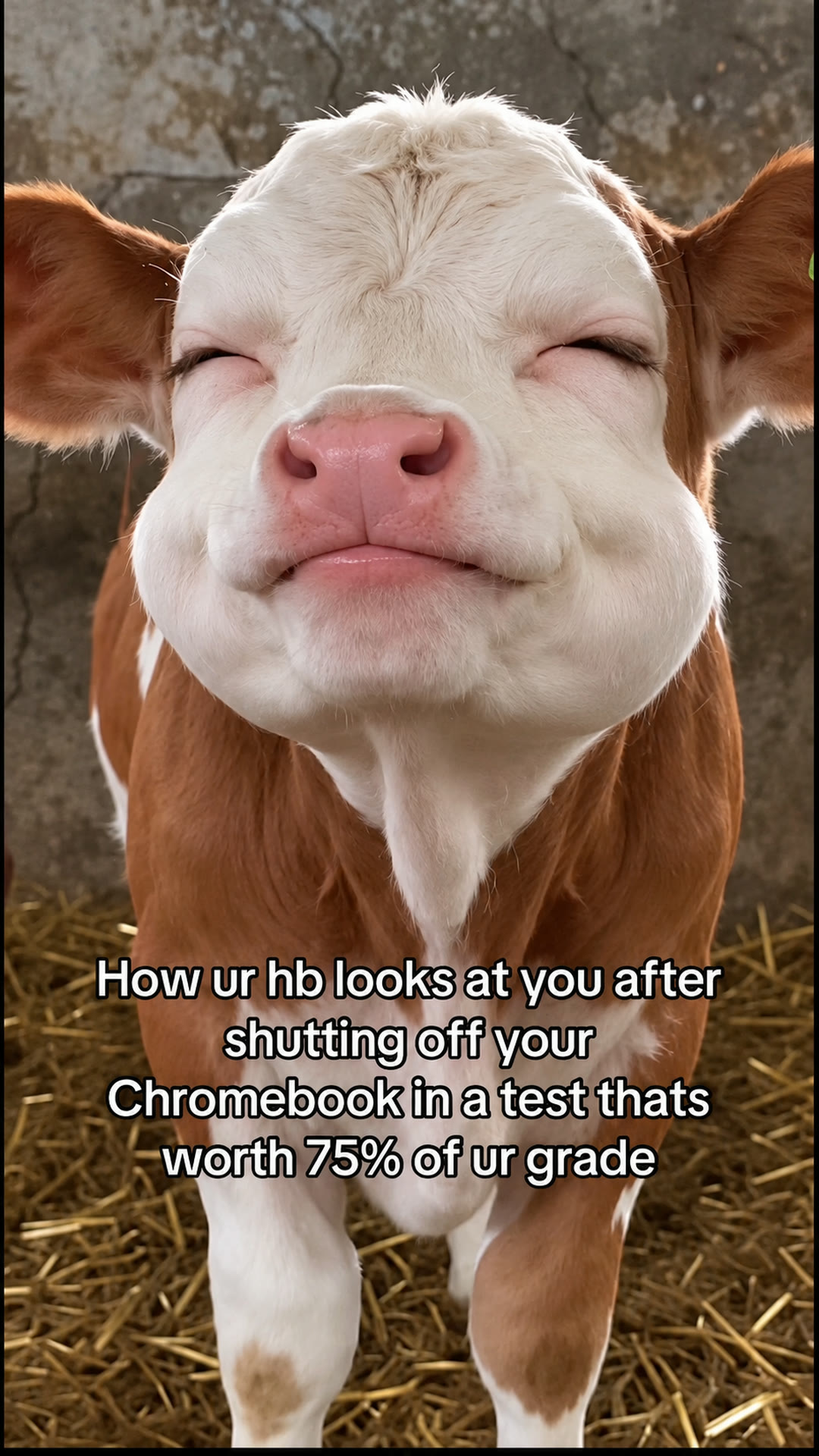
Load TikTok’s player to watch this reference. This connects your browser to TikTok.
If the player is unavailable in your region or the post has been removed, try opening the original post.
View original post ↗
One photo of your pet or of you plays the smug barn calf: eyes squeezed shut, a slow side-to-side head shake, then eyes and mouth snap open. 8-second vertical video. Silent, or with the original clip sound for personal viewing.
To post, download it silent and add the trending sound in TikTok or Reels.
0 of 1 required
Add your photos
0 of 1 added
Your pet
Photo 1: your dog or cat, face clearly visible and toward the camera. The photo supplies the face, fur and markings; the barn, the head shake and the caption come from the clip.Use photos you have permission to use.
We’ll email a link to the email you use at checkout. No sign-in is needed to view your video.
Load TikTok’s player to watch this reference. This connects your browser to TikTok.
If the player is unavailable in your region or the post has been removed, try opening the original post.
View original post ↗Credit does not establish trend ownership or permission to reuse a creator’s work.
To make the Shaking Head AI video, upload one photo and generate. You get a 8-second vertical video for 50 credits; the smallest pack is USD 6.99. Download it silent and add the sound when you post, or with the original clip's sound for personal viewing.
This template recreates the Shaking Head trend from TikTok: a brown-and-white calf in a barn stands close to a still phone camera, squeezes its eyes shut with a smug closed-mouth grin, slowly shakes its head side to side, then snaps its eyes and mouth wide open, and does it again. Upload one photo and your pet or you take the calf's place.
Pets or People. Choose Pets to put your dog or cat in the barn, or People to play the smug face yourself. Both tabs use the same clip and the same length.
Good photos. One clear photo with the face toward the camera and well lit. The face is the whole joke here, so a sharp front view matters more than the body. For people, only upload a photo of an adult who has agreed to appear.
The barn, the straw, the close camera and the white school-joke caption about shutting off a Chromebook during a test come from the original clip and stay in your video. Your photo supplies the face, fur or hair and, for people, the top you wear.
More AI dog dance templatesMore AI cat dance templatesUSD 6.99 buys 50 credits, enough for one video with this template. This is a one-time purchase. Taxes are shown at checkout.
Most videos are ready in about 7 minutes. If a generation fails, your credits come back automatically.
Credits come in one-time packs, with no subscription. See current prices.
The original clip is one fixed close-up of a calf in a barn, filmed on a still phone camera.
The calf looks straight into the camera with its eyes and mouth wide open.
It squeezes its eyes shut, closes its mouth in a smug grin and slowly shakes its head from side to side.
The eyes pop open, then the mouth drops wide open as it stares at the camera.
Eyes shut and smug grin again, with another slow side-to-side shake.
The eyes and then the mouth snap wide open once more and hold to the end.
A TikTok trend from October 2026. A close-up of a calf in a barn squeezing its eyes shut with a smug grin, shaking its head slowly and then staring wide-eyed with its mouth open drew millions of plays, and people and pets were still posting their own head-shake versions at the end of the month. This template recreates that clip with your photo. Vellm is not affiliated with the creator of the original clip.
One: a photo of your dog or cat, or a photo of one adult who has agreed to appear.
Only of an adult who has agreed to appear. No celebrities and no one under 18.
Yes. The white caption from the original clip stays in the same place in your video. Pick this template if that joke works for you.
8 seconds, vertical 9:16, with a 1080p enhanced export. Download it silent, or with the original clip's sound for personal viewing.
50 credits. The smallest one-time pack that covers it is 50 credits for USD 6.99. No subscription is needed.
Yes. Every video comes in two versions: silent, best for posting (add the trending sound in TikTok or Reels), and with the original clip's sound, for personal viewing. The sound isn't licensed for public posts.
The clip guides every eye squeeze, head shake and open-mouthed look. Check the close-up face against your photo: when the eyes are squeezed shut or the mouth is wide open, small details such as markings or teeth can drift. A new generation uses another 50 credits and may look different.
A failed generation returns the credits it used. This is a credit return, not a cash refund. For a completed result or billing issue, contact support. See the service terms for details.
No. Your downloaded video has no watermark.
Most videos are ready in about 7 minutes; allow about 10–15 minutes when the service is busy. We email you when your video is ready.
No account is needed for a one-time purchase. Use your checkout email to recover your creations. If you create a video while signed in, use the same account to view it.
AI results vary, and a new generation uses credits. If you run into a technical problem, email support@vellm.app.
You can request a refund for a one-time credit pack within 7 days of purchase if none of its credits have been used. Email support@vellm.app. See our terms for details and your consumer rights.
Photos and videos, including the version with sound, are scheduled for deletion after 7 days. Download your video before it expires. See our Privacy Policy for details.
contact support · Terms of Service · Privacy Policy
How credits and video costs work