 Vellm
Vellm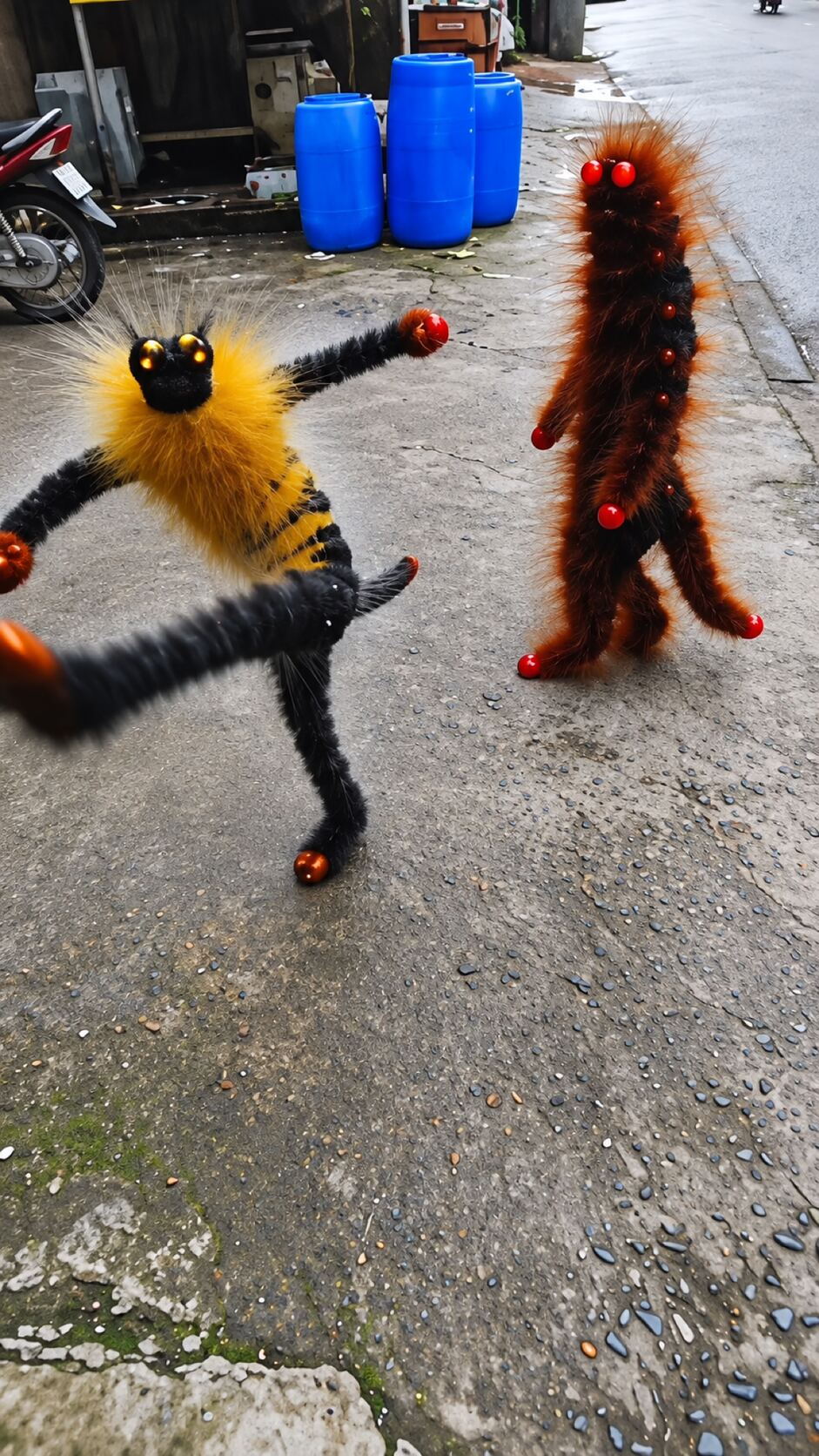
Load TikTok’s player to watch this reference. This connects your browser to TikTok.
If the player is unavailable in your region or the post has been removed, try opening the original post.
View original post ↗
Two pet photos become the Bing Bing Bing kicking duo: your pets stand up on a street and take turns kicking at the camera. 12-second vertical AI video. Silent, or with the original clip sound for personal viewing.
To post, download it silent and add the trending sound in TikTok or Reels.
0 of 2 required
Add your photos
0 of 2 added
First kicking pet
Photo 1: walks in from the left and kicks firstSecond kicking pet
Photo 2: starts in the middle, then kicks from the rightUse photos you have permission to use.
We’ll email a link to the email you use at checkout. No sign-in is needed to view your video.
Load TikTok’s player to watch this reference. This connects your browser to TikTok.
If the player is unavailable in your region or the post has been removed, try opening the original post.
View original post ↗Credit does not establish trend ownership or permission to reuse a creator’s work.
To make the Bing Bing Bing kicking video, upload two pet photos, one for each kicker, and generate. You get a 12-second vertical video of your pets kicking at the camera for 50 credits; the smallest pack is USD 6.99. Download it silent and add the trending sound when you post, or with the original clip's sound for personal viewing.
This template recreates the Bing Bing Bing kicking trend, also searched as the bing bing bing meme or the kicking meme. In the original AI clip, two fuzzy creatures stand on their back legs on a wet side street and take turns running up to the phone to kick at it. Upload two pet photos and your pets take their places.
First kicker. Photo 1 walks in from the left, throws the first big kick and later charges right up to the lens.
Second kicker. Photo 2 starts in the middle of the street, then kicks and swings its paws from the right, and gets the last kick of the clip.
Good photos. Two separate photos, one pet in each, with the face, ears, legs and paws visible. Cats, dogs or one of each all work.
Both photos are required. Use two different pets, and avoid photos with two pets in one frame: the template needs to know which pet plays which role.
Cat photo tips for AI dance videosMore AI dog dance templatesMore AI cat dance templatesUSD 6.99 buys 50 credits, enough for one video with this template. This is a one-time purchase. Taxes are shown at checkout.
Most videos are ready in about 7 minutes. If a generation fails, your credits come back automatically.
Credits come in one-time packs, with no subscription. See current prices.
The original clip, beat by beat: one handheld take with no cuts. Your two pets take the places of the two creatures; the street, camera moves and timing stay the same.
One creature stands in the middle of a wet side street; the other walks in from the left and throws a big kick at the camera.
The creature on the right steps up close, swings a paw at the lens and backs off again.
The first kicker rushes the camera and kicks while the person filming reaches a hand and a sandaled foot into the frame.
The second kicker comes up to the lens swinging its arms, then both drop back beside the parked motorbikes.
The first kicker comes forward again and kicks high toward the camera.
The first kicker steps aside and the second one charges the camera for the final kick.
Short AI videos where two characters stand side by side on a street and take turns kicking at the phone to a punchy beat. The best-known clip uses two fuzzy AI creatures. This template puts your own two pets in that clip.
Two photos, one pet in each. Photo 1 walks in from the left and kicks first; Photo 2 starts in the middle and kicks from the right. Both are required.
Yes. Each photo can be a cat or a dog. Each pet keeps its own species and look while it copies the kicks.
Not with this template. It takes two pet photos only.
12 seconds, vertical 9:16, with a 1080p enhanced export. Download it silent, or with the original clip's sound for personal viewing.
50 credits. The smallest one-time pack that covers it is 50 credits for USD 6.99. No subscription is needed.
Yes. Every video comes in two versions: silent, best for posting (add the trending sound in TikTok or Reels), and with the original clip's sound, for personal viewing. The sound isn't licensed for public posts.
The original clip sets every kick, camera move and the street. Check that each pet keeps its own coat and face, including the blurry close-ups where a kick fills the frame; AI can mix up markings when the two pets look alike. A new generation uses another 50 credits and may look different.
A failed generation returns the credits it used. This is a credit return, not a cash refund. For a completed result or billing issue, contact support. See the service terms for details.
No. Your downloaded video has no watermark.
Most videos are ready in about 7 minutes; allow about 10–15 minutes when the service is busy. We email you when your video is ready.
No account is needed for a one-time purchase. Use your checkout email to recover your creations. If you create a video while signed in, use the same account to view it.
AI results vary, and a new generation uses credits. If you run into a technical problem, email support@vellm.app.
You can request a refund for a one-time credit pack within 7 days of purchase if none of its credits have been used. Email support@vellm.app. See our terms for details and your consumer rights.
Photos and videos, including the version with sound, are scheduled for deletion after 7 days. Download your video before it expires. See our Privacy Policy for details.
contact support · Terms of Service · Privacy Policy
How credits and video costs work