 Vellm
Vellm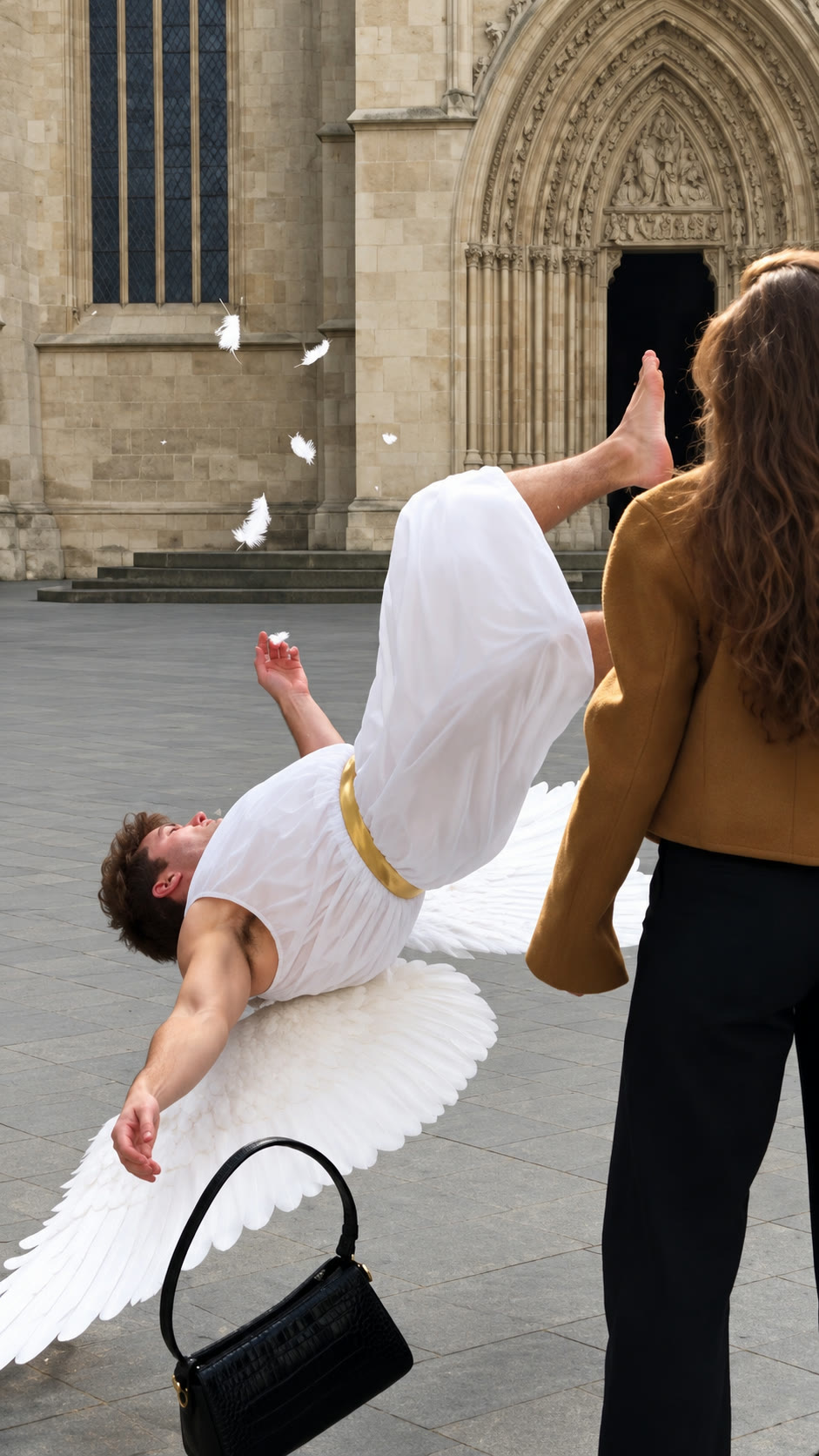
Watch this reference on Instagram.
View original post ↗AI Cupid Trend
One photo puts you in the AI Cupid trend: knock Cupid flat with your handbag, or dodge his arrows and fall for a coat instead. 15-second silent vertical AI video.
50 credits · from $3.33 / videoWith the 600-credit pack ($39.99 total). Taxes calculated at checkout.See prices
Create your video
Your photo
0 of 1 required
Add your photos
0 of 1 added
Your photo
A clear photo of one adult who has agreed to appear, with the face and upper body visiblePhoto tips
- Use a photo of yourself or another adult who has agreed to appear
- Clear face and hair, good lighting
- Your photo supplies the face and hair; the video supplies the brown jacket, the handbag and the moves
Use photos you have permission to use.
QualityHD · 1080pChange
We’ll email a link to the email you use at checkout. No sign-in is needed to view your video.
About this trend & references
Trend references
Watch this reference on Instagram.
View original post ↗Credit does not establish trend ownership or permission to reuse a creator’s work.
Handbag or Arrow: which one?
Handbag1 photo of you
Cupid dives at you across a cathedral square and you knock him down with your handbag. 15 seconds.
Make this versionArrow1 photo of you, plus an optional second person
A cherub's arrow hits you on an autumn street, the next one lands in a coat in a shop window, and you fall for the coat. 15 seconds.
Make this version
One photo, you play the lead
This template recreates the AI Cupid trend, also searched as cupid AI video or the cupid handbag trend. A winged Cupid picks you as his target, and it goes wrong for him. Upload one photo and you play the lead in every shot.
Handbag. Cupid leaps from a cathedral ledge and dives at you across the square. You spin round, swing your handbag, and he lands flat on his back among white feathers while you pick up your bag and walk off.
Arrow. A cherub shoots you on an autumn street, then misses a man by a shop window and hits a green leather trench coat on a mannequin. You see the coat through the glass and smile. Add a second photo to cast the man; leave it empty and a new person plays him.
Good photo. One adult who has agreed to appear, alone in the photo, with the face and hair clearly visible. The outfit comes from the original clip.
Use a photo of one person only. Cupid, the man by the window and the people in the background are generated as new characters, not taken from your photo.
Your video, at a glance
- Length
- 15 seconds
- Format
- 9:16
- Export
- 1080p enhanced
- Sound
- Silent video
- Watermark
- None
- Per generation
- 50 credits
USD 4.49 buys 50 credits, enough for one video with this template. This is a one-time purchase. Taxes are shown at checkout.
One-time credit packs are available. A subscription is optional. See current prices.
What happens in the AI Cupid handbag clip
The original Handbag clip, beat by beat. You play the woman in the brown jacket; the setting, camera and timing stay the same.
0–3 s Cupid on the ledge
Seen from high above, a winged Cupid sits on a cathedral ledge with a golden bow, spots a small figure crossing the square, and leaps off.
3–6 s The dive
The camera follows him from behind as he swoops low over the stone square toward the woman walking below.
6–9 s Handbag swing
As he flies in from behind, she spins round and hits him with her black handbag; he flips over and crashes to the ground in a burst of feathers.
9–12 s Down among the feathers
Cupid lies sprawled on his wings with the bow beside him while she looks down at him, then bends to pick up her bag.
12–15 s Walk away
She straightens her jacket and walks toward the camera, calm, leaving him on the ground.
Before you generate
What is the AI Cupid trend?
A short AI clip trend on Instagram and TikTok in which Cupid aims at someone and something comic happens: he gets knocked down with a handbag, or his arrow ends up in a coat. This template recreates it with your photo.
How many photos do I need?
One photo of one adult, with the face and hair clearly visible. Arrow also takes an optional second photo for the man by the shop window.
Whose photo can I use?
Your own photo, or a photo of another adult who has agreed to appear. Do not upload photos of public figures or of people who have not agreed.
Which versions can I make?
Handbag: Cupid dives at you and you knock him down with your bag. Arrow: Cupid's arrows hit you, then a coat in a shop window, and you fall for the coat. Both are 15 seconds, vertical 9:16.
How much does one AI Cupid video cost?
50 credits. The smallest one-time pack that covers it is 50 credits for USD 4.49. No subscription is needed.
Is the music included?
The video exports without sound. Add music available for your account and intended use in your posting app, then check the timing before sharing.
Will it match the reference?
Check that your face stays the lead in the wide shots too: in Handbag you first appear as a small figure crossing the square, and in Arrow you are seen through the shop window at the end. A new generation uses another 50 credits and may look different.
What if generation fails?
A failed generation returns the credits it used. This is a credit return, not a cash refund. For a completed result or billing issue, contact support. See the service terms for details.
Will my video have a watermark?
No. Your downloaded video has no watermark.
How long does generation take?
Generation usually takes about 10–15 minutes. It can take longer when the service is busy. We email you when your video is ready.
Do I need an account?
No account is needed for a one-time purchase. Use your checkout email to recover your creations. If you create a video while signed in, use the same account to view it.
What if I don’t like the result?
AI results vary, and a new generation uses credits. If you run into a technical problem, email support@vellm.app.
Can I get a refund?
You can request a refund for a one-time credit pack within 7 days of purchase if none of its credits have been used. Email support@vellm.app. See our terms for details and your consumer rights.
How long do you keep my photos and videos?
Photos are scheduled for deletion after 7 days and videos after 30 days. Download your video before it expires. See our Privacy Policy for details.
contact support · Terms of Service · Privacy Policy
How credits and video costs work